Harsher Reality
1 · What it is
Harsher Reality takes a sound from clean and expensive to broken and hostile, through six media that fail like the real machines they are, then optionally forces the sound to fight back with the DENIAL recovery stage. Use it for lo-fi beds, aged textures, broadcast vibes, or full signal destruction with the soul left in.
2 · Installation
macOS
- PKG installer (recommended): double-click, everything lands in the right folders automatically.
- Drag-install DMG: drag Harsher Reality.app to Applications, drag the .vst3 into
~/Library/Audio/Plug-Ins/VST3and the .component into~/Library/Audio/Plug-Ins/Components, then restart your DAW.
Windows
Run the installer. The VST3 goes to C:\Program Files\Common Files\VST3, the standalone to your Start menu.
Logic lists the plugin under Audio Units → Piruz Labs. If it does not appear, confirm the .component is in ~/Library/Audio/Plug-Ins/Components and restart Logic.
3 · Editions, trial and activation
| Lite (free forever) | Pro ($39.95, once) | |
|---|---|---|
| Media | Tape, Cassette, Vinyl | All six (+ VHS, Radio, Digital) |
| Damage | Wow/Flutter, Drop Outs, Wear, Hiss, Dust, Saturate, Mix | Everything, + Scratches, Tracking, Jitter, Drive |
| Recovery | — | DENIAL recovery stage |
| Drop-a-WAV + Export | — | Included |
Every install starts a 7-day full Pro trial, no card needed. When it ends, the plugin falls back to Lite, never silence. To activate Pro, click the badge in the top-right corner (TRIAL / GET PRO) and paste your licence key. Your key allows 3 machines; manage them at your account page.
4 · The interface
Media tabs (which machine is failing)
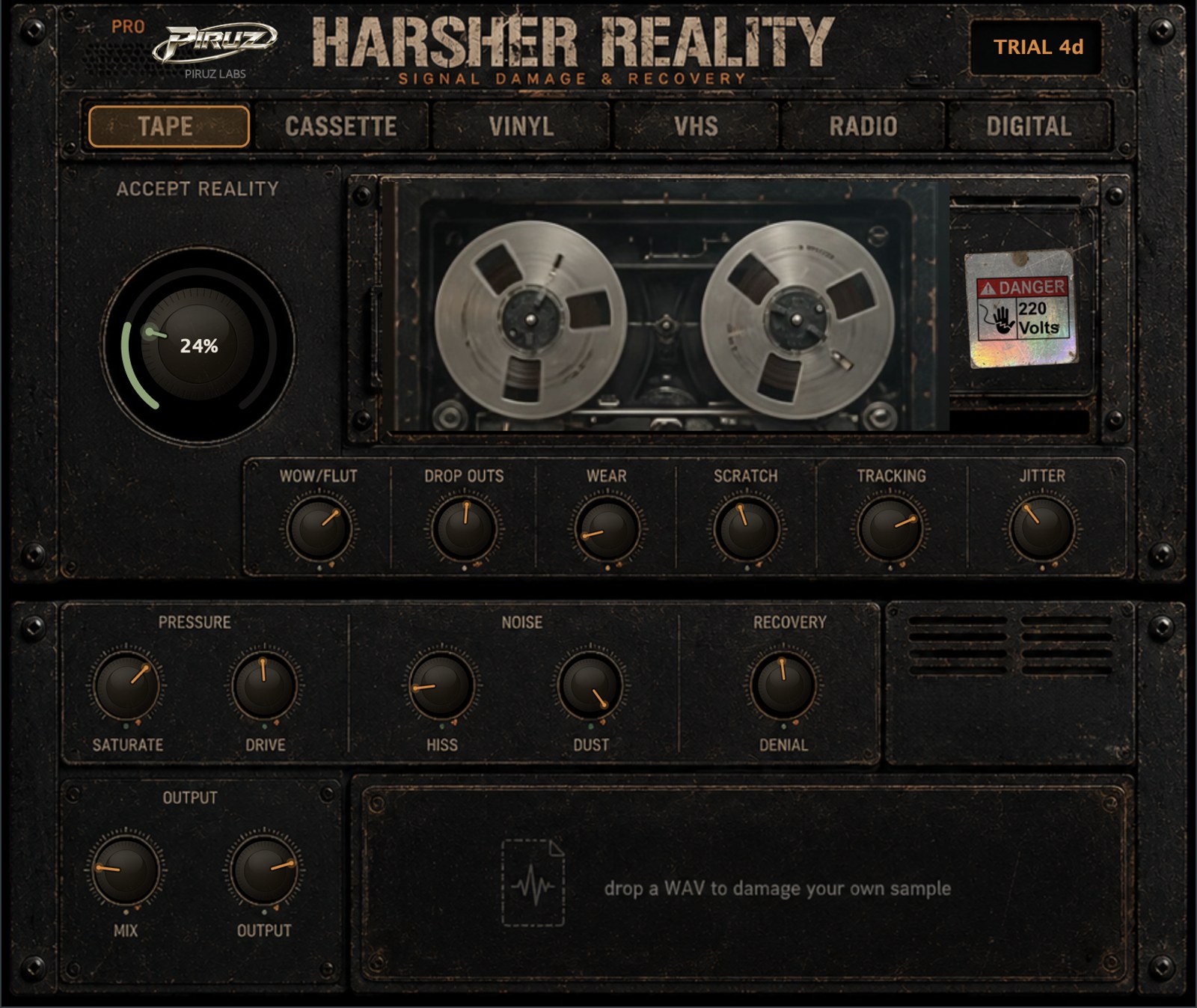
The six tabs choose the character of the damage, not the amount. Each medium has its own baked-in voice, present even with all damage knobs at zero, and its own animated machine in the window:
| Medium | Signature |
|---|---|
| Tape | warm, gentle, low hiss |
| Cassette | bright tape hiss, flutter |
| Vinyl | crackle spikes, dark surface noise, true 33 rpm wow |
| VHS | slow wobble, mains hum |
| Radio | squeezed bandpass, static bed |
| Digital | dead-silent floor, pure crunch |
ACCEPT REALITY (how hard it is failing)
The big dial is the master damage amount, from clean at 0% to fully broken at 100%. Every damage process and each medium's baked character scale with it. The ring shifts from cool to amber to hot as you push.
Damage row
- WOW/FLUT — pitch instability: slow wow plus fast flutter, flavoured per medium.
- DROP OUTS — media-aware signal loss. Tape/Cassette/Vinyl: classic brief dropouts. Radio: the station fades away while static swells up, then returns. Digital: hard 20–140 ms glitch cuts.
- WEAR — high-frequency loss and grit; on Digital it becomes bit-crush.
- SCRATCH (Pro) — sharp clicks and pops.
- TRACKING (Pro) — slow pitch-and-gain wander, like a deck losing alignment.
- JITTER (Pro) — digital timing noise.
Pressure / Noise / Recovery
- SATURATE — analogue warmth, voiced per medium.
- DRIVE (Pro) — harder push into the same stage.
- HISS — noise floor on top of the medium's own; the tone follows the medium (dark vinyl surface, bright cassette hiss, radio static).
- DUST — sparse crackle on top of the medium's own.
- DENIAL (Pro) — the recovery stage. It listens to what the damage removed (air, body, attack) and pushes it back through the wreckage. The sound stays broken but refuses to die. Try ACCEPT high with DENIAL around 60%.
Output
MIX blends dry and damaged; OUTPUT trims the final level. A safety limiter prevents overs at unity.
5 · Presets
The PRESET plate (right of RECOVERY) shows the current preset. The < and > arrows step through the factory set; click the name to open the full browser: factory presets (Pro ones marked), your saved presets, Save preset… and Open presets folder. Presets store everything: the medium and every knob. Your presets live in ~/Library/HarsherReality/Presets (macOS). Your DAW's own preset menu works too.
6 · Drop a WAV & Export (Pro)
- Drag any audio file (WAV, AIFF, MP3, FLAC, OGG, M4A) onto the zone at the bottom, or click the zone to browse. The file loops through the whole engine in place of the live input.
- Shape the damage while it loops. Click the zone to pause/resume, double-click to unload.
- Press EXPORT: the file is rendered offline through your exact settings and saved as
name_harsher.wav(24-bit) next to the original, then revealed in Finder/Explorer.
7 · Troubleshooting
- No sound in the standalone: the standalone mutes its input by default to avoid feedback. Click Settings… in the banner to choose your input and output devices, or just drop a WAV on the zone.
- Plugin missing in Logic: see the Installation tip above, then restart Logic. If needed, run
auval -v aufx Hrsh Pruzin Terminal to confirm the AU validates. - Media tabs 4–6 will not select: VHS, Radio and Digital are Pro media. In Lite they open the upgrade dialog.
- Trial expired: the plugin keeps working as Lite forever. Activate any time from the badge.
- Licence moved to a new computer: deactivate an old machine from your account, then activate on the new one.
8 · Support
Bugs and questions: piruzlabs.com/feedback or the contact page. A real human reads everything, usually the one who wrote the DSP.